Layout Guide

Blogger's Layout feature is an easy-to-use template editing feature that allows you to edit and customize your Blogger template without any knowledge of HTML or CSS. You can easily edit and customize the colors, fonts, header and sidebar of your blog with a few clicks of the mouse. To customize your blog's layout, go to the Layout | Page Elements tab in Blogger. Layouts Tab

If you're using a classic template and would like to use the Layout feature, you can read instructions on how to switch.

Moving elements in your template

How to arrange elements in your template

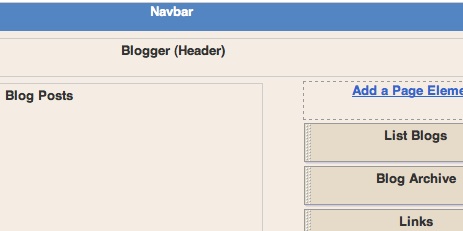
You can arrange the elements in your template the way you want them displayed. Simply click on the element you'd like to move and drag and drop it where you want it to be. You can move your page elements to the bottom of the page, anywhere in your sidebar, or below or above your blog posts. (Note: you can move all elements except your navbar, blog posts and header in some templates.) Layouts
Editing elements in your template

Here's an overview of what you can configure when you click Edit for each of these elements:

  • Navbar: Select the color you'd like your Navbar to be.
  • Header: Add or edit the header of your blog, which includes your blog title and blog description.
  • Blog posts: Choose the number of posts to display on your main page. You can choose either the number of days with posts to display or the total number of posts on the main page. You also have the option to show email post links that let your visitors easily email posts from your blog to their friends.
  • Profile: Edit/add your profile title, 'About Me' description, and location.
  • Blog archive: Edit/add your blog archive title, select your display style (hierarchy, flat list or dropdown menu), choose to display post titles, display oldest posts first, choose your archive frequency (monthly, weekly or daily) and date format.

How to add a page element

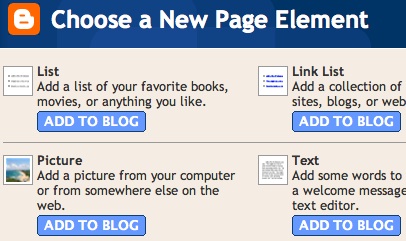
You can add several page elements to your blog page or sidebar by clicking Add a Page Element. This will open a pop-up window. Click Add to Blog in the proper element section to add it:
New Page Element

  • List: Add a list with the ability to add a title, select the number of items to display, sort your list alphabetically and add links to your list elements.
  • Link List: Add a link list to your blog with the ability to add a link list title, select the number of items to display and sort your link list alphabetically.
  • Labels: Add a list of all the labels you've used on your posts. Click each link to see a page showing all the posts with that label. You can change the title of the list, and sort it alphabetically or by frequency of use.
  • Picture: Add a picture from your computer or the web. You can also add a title and caption to your picture and shrink the picture to fit into your blog perfectly.
  • Text: Add text to your blog (such as a welcome message or footnote) with our rich text editor.
  • HTML/JavaScript: Add third-party functionality or other HTML/JavaScript code to your blog.
  • Feed: Add content from a site feed. Enter the feed URL, then click Continue. You'll then be able to add a title, select the number of items to show (up to five) and display the item dates and/or authors by selecting the appropriate check boxes.
  • Logo: Add one of our stylish Blogger logos to your blog.


|

Read Users' Comments ( 0 )

Teknologi Engsel Ponsel

Teknologi Mobile Display digital Interface (MDDI) dirancang khusus untuk menjalankan fitur multimedia pada ponsel berdesain selain candy bar.

Desain candy bar sampai saat ini masih mendominasi model ponsel disamping desian lainnya seperti flip atau clamshell. Berbagai ponsel pun kini hadir dengan berbagai macam desain yang lebih menarik. Mulai dari slidding, swing, rotating display sampai dengan pop up display.

Desain ponsel selain candy bar mempunyai ciri yang khas antara layar dan keypadnya terpisah atau tidak berada dalam satu bagian. Bagi vendor ponsel desain seperti ini tentunya akan lebih rumit dalam membuatnya. Atau bisa saja dapat menambah biaya produksi, karena harus menyediakan komponen tambahan yaitu kabel yang menghubungkan bagian layar dengan bagian keypad.

Kini telah hadir standar teknologi terbaru untuk menghubungkan bagian layar dan keypad pada ponsel yang terpisah, namanya Mobile Display Digital Interface (MDDI). MDDI dikembangkan Qualcom. Teknologi ini diintegrasikan ke dalam chipset buatan Qualcom untuk perangkat bergerak. Khususnya perangkat yang menggunakan teknologi CDMA dan WCDMA. MDDI mulai dibuat pada chipset Qualcom dengan seri MSM6150 dan MSM6550 untuk teknologi CDMA2000 dan MSM6275 dan MSM6280 untuk teknologi WCDMA. Sepertinya teknologi MDDI ini khusus dikembangkan untuk mendukung teknologi seluler masa depan.

MDDI mempunyai beberapa keunggulan dibandingkan teknologi sebelumnya. Diantaranya yaitu lebih hemat dalam konsumsi daya baterai, mampu mensupport layar LCD dengan ukuran QVGA dan juga mampu mensuport kamera dengan ketajaman 1 megapixel sampai dengan 3 megapixel. Kemampuan MDDI tidak hanya mampu mengontrol satu layar, tetapi juga bisa mengontrol dua layar sekaligus (internal dan eksternal). Dan ada satu keunggulan lainnya yang menjadi andalan dari teknologi ini yaitu mampu mengurangi kabel yang melintas antara bagian layar dan keypad. Sebelumnya dibutuhkan 21 kabel, kini hanya lima kabel saja. Dengan sistem kerja dua kabel bertugas mentransfer data, dua kabel berfungsi sebagai sinkronisasi antara layar dan keypad sebagai controller dan satu kabel lagi berfungsi untuk mengalirkan daya. Dengan adanya pengurangan jumlah kabel ini, tentunya sagat bermanfaat bagi pihak vendor, karena mampu mengurangi biaya produksi.

Meskipun MDDI hanya membutuhkan lima kabel namun tidak mengurangi kecepatan transfernya. Bahkan teknologi ini tergolong kedalam teknologi yang mampu mentransfer data dalam kecepatan tinggi. Karena MDDI mampu mentransfer data secara bi-directional dengan kapasitas bandwith maksimum 3,2 gigabits per detik. Dengan begitu maka berbagai fitur multimedia dengan kapasitas besar, 3G games misalnya, tetap bisa dinikmati dengan nyaman. Padahal semakin canggih fitur yang dijalankan pada perangkat dengan desain layar dan keypad yang terpisah, maka jumlah kebel yang dibutuhkan untuk mentransfer data antara bagian keypad dan layar semakin banyak.

Beberapa vendor sudah mulai mengaplikasi teknologi MDDI ini, diantaranya yaitu Samsung dan Sharp. VESA (Video Elctronics Standards Association), yaitu organisasi dunia yang beranggotakan lebih dari 110 perusahaan elektronika, juga telah mensupport adanya standar teknologi terbaru ini. Kedepannya MDDI tampaknya tidak hanya diimplementasikan pada ponsel saja. Tetapi juga bisa diimplementasikan pada perangkat lainnya seperti laptop, pocket PC (PDA) dan lainnya.

Sumber dari : T&t Edisi 33/IV, November 2004.


|

Read Users' Comments ( 0 )